
USB Port Lock
Install and remove your USB Port Lock in a few simple steps. Scroll down for installation by hand, installation by key, and removal.
User Guides / USB Port Lock
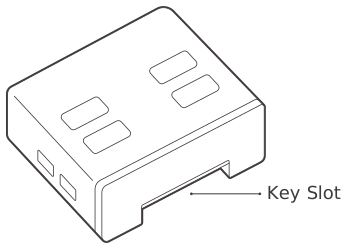
USB Port Lock
This is a physical cybersecurity device that prevents unauthorized connection to an unused USB port.
| Environment | USB Port Type A |
|---|
By Hand
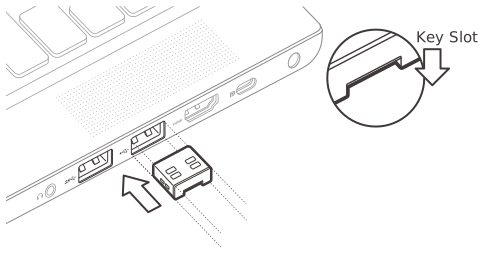
Insert by hand
Insert the USB Port Lock by hand by pressing inward with your fingers.
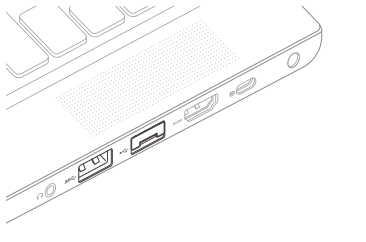
Installation complete
Installation is complete.
The USB Port Lock is designed to work with ports that follow USB standards. Some products in the marketplace may have USB ports that do not follow the USB standard perfectly. If a port lock is hard to insert, forcing it may cause damage to the port.
By Key
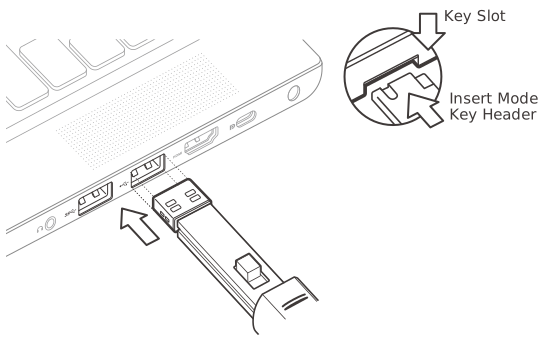
Press the key forward
When in insert mode, the key can be inserted into the lock. Once the lock has been properly aligned with the open port, press the key forward to install the lock.
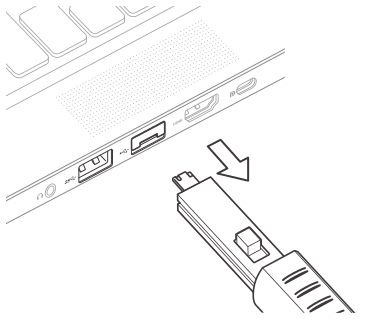
Pull the key back out
When the port lock is fully inserted into the port, pull the key back and out to release it from the lock.
Using the key for installation is helpful when space is limited.
Removal
• Keys and locks are matched by color.
• During removal, if the lock catches on the surrounding frame, please apply pressure
in the opposing direction as you pull it out.
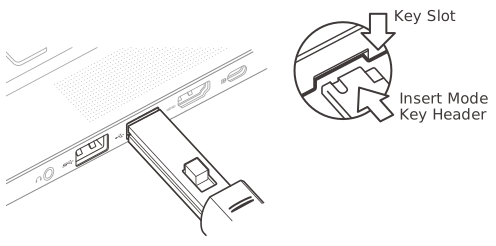
Insert the key
Insert the key into the key slot at the bottom of port lock with the button on the key facing upward.
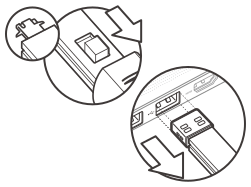
Engage & pull out
Press the button of the key backwards to engage the lock for removal and pull out the key.
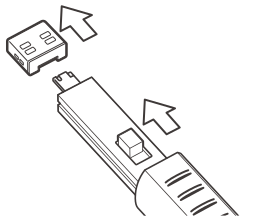
Release the lock
Press the button of the key forward to release the lock from the key.