
USB Cable Lock
Fit the cable and cover, lock the cable into the USB port, and release it with the key. Scroll down for each step.
User Guides / USB Cable Lock
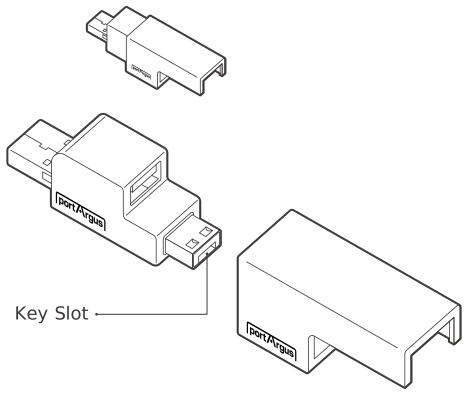
USB Cable Lock
This is a physical cybersecurity device that locks a single USB cable to a USB port so that it cannot be removed without a key.
| Environment | USB Port Type A |
|---|---|
| Component | Cable Lock 1EA, Cable Cover 1EA |
| Dimensions | W × H × L (Depth): 16.2 × 16 × 40.9 mm (0.64 × 0.63 × 1.61 in) |
| Weight | 10 g (0.35 oz) |
Installation
Align the portArgus mark between cable lock & cover.
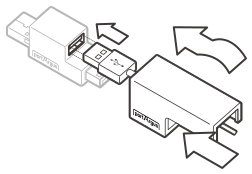
Insert the cable
Insert the USB cable through the cover and into the port on the cable lock.
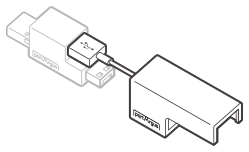
Keep the orientation
Take care to maintain proper orientation.
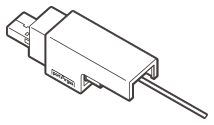
Push the cover forward
Push the cover forward until it fits securely against the cable.
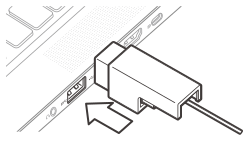
Insert into the USB port
Insert the Cable Lock into the USB Port.
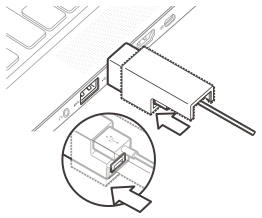
Press the lock button
Press the lock button on the Cable Lock to complete the installation.
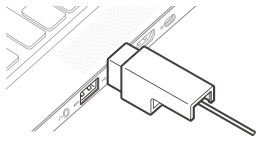
Installation complete
Installation is complete.
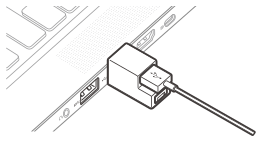
If the size of the USB plug is larger than the cover, you can use it without the cover.
(The USB device can be removed, but it cannot be inserted again unless release USB Cable Lock with the key.)
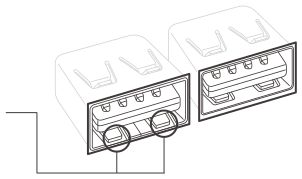
Not applicable due to opened internal hole of USB port.
Removal
• Keys and locks are matched by color.
• Press the button of the key forward to change to Insert Mode.
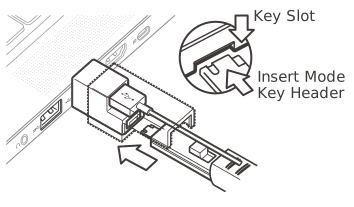
Insert the key
Insert the key into the key slot at the bottom of port lock with the button on the key facing upward.
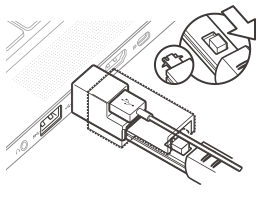
Engage & pull out
Press the button of the key backwards to engage the lock for removal and pull out the key.
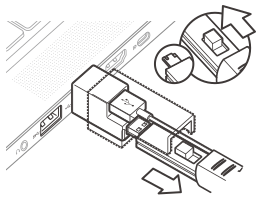
Release the lock
Press the button of the key forward to release the lock from the key. Next, release the USB Cable Lock by hand.