
Smart Data Blocker
Insert it into the USB port, lock it, and charge through it with data blocked. Remove it with the key. Scroll down for each step.
User Guides / Smart Data Blocker
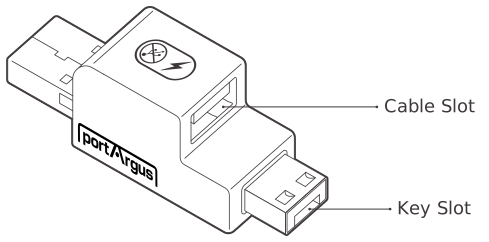
Smart Data Blocker
This device blocks all data connection to a USB port while allowing the port to be used for charging.
| Environment | USB Port Type A |
|---|---|
| Component | Smart Data Blocker 1EA |
| Dimensions | W × H × L (Depth): 16.2 × 16 × 40.9 mm (0.64 × 0.63 × 1.61 in) |
| Weight | 10 g (0.35 oz) |
Precautions
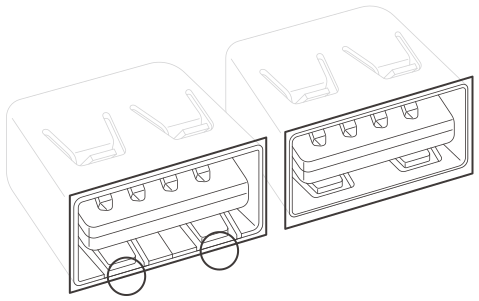
• As illustrated, some USB ports may be mechanically incompatible.
• The Smart Data Blocker is designed to work with ports that follow industry standards. Some products
in the marketplace may have ports that do not follow industry standard perfectly. If a port lock is hard
to insert, forcing it may cause damage to the port.
Installation
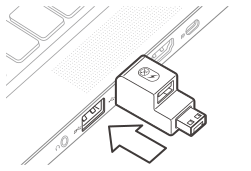
Insert into the port
Insert the Smart Data Blocker into the port to be used.
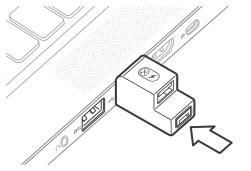
Press the lock button
Press the lock button to secure to the port. Please note that no data is transferred. The port can only be used for charging.
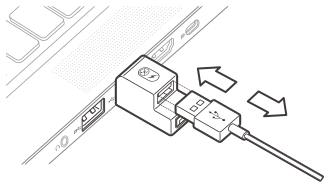
Connect the cable
As illustrated, please take note to ensure proper cable orientation before inserting.
Removal
Keys and locks are matched by color.
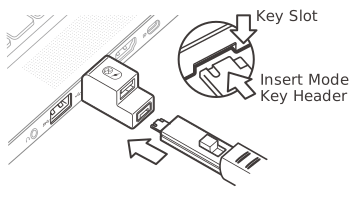
Insert the key
Insert the key into the key slot at the bottom of Smart Data Blocker with the button on the key facing upward.
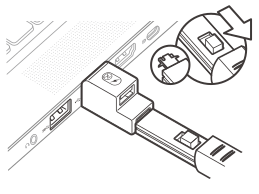
Engage & unlock
Pull the button of the key backwards to engage for removal. Once engaged, pull the key backwards to unlock.
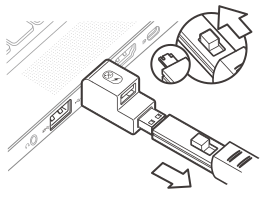
Release the key
Push the button of the key forward to release the key from the Smart Data Blocker.