
RJ45 Port Lock
Set the lock to the Unlocked Position, install it by hand or by key, and remove it with the key. Scroll down for each step.
User Guides / RJ45 Port Lock
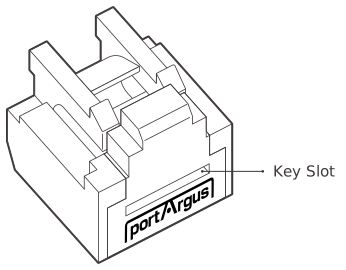
RJ45 Port Lock
This is a physical cybersecurity device that prevents unauthorized connection to an unused RJ45 Ethernet port.
| Environment | RJ45 Ethernet Port |
|---|---|
| Component | RJ45 Port Lock |
| Dimensions | W × H × L (Depth): 11.7 × 9.6 × 11.5 mm (0.46 × 0.38 × 0.45 in) |
| Weight | 0.7 g (0.02 oz) |
Unlocked Position
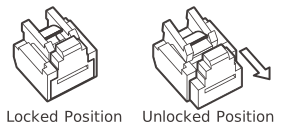
Before installation, make sure it is unlocked.
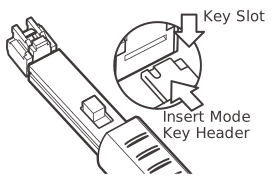
Insert the key
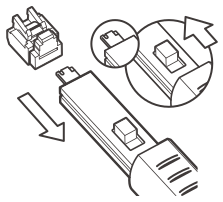
Insert the key into the key slot of the port lock with the button on the key facing upward.
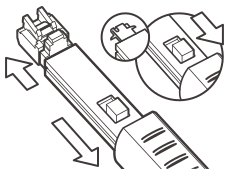
Pull back to unlock
Press the button of the key backward and pull out the port lock backward for Unlocked Position.
Release the port lock
Press the button of the key forward to release the port lock from the key.
By Hand
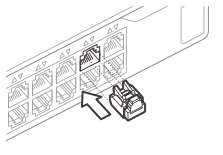
Insert by holding the sides
The RJ45 Port Lock can be installed only while in Unlocked Position. Insert by holding the sides so that it does not go into Locked Position during installation.
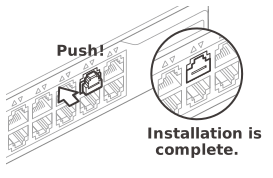
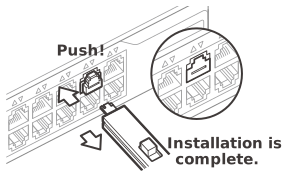
Push to lock
As illustrated, press the front part of RJ45 Port Lock to lock it into the port.
By Key
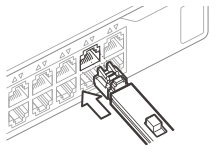
Using the key for installation is helpful when space is limited. Insert the lock while in Unlocked Position and while the key is in Insert mode.
Removal
Keys and locks are matched by color.
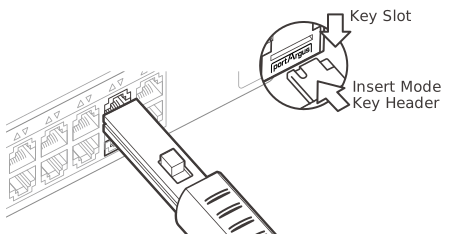
Insert the key
Insert the key into the key slot of the port lock with the button on the key facing upward.
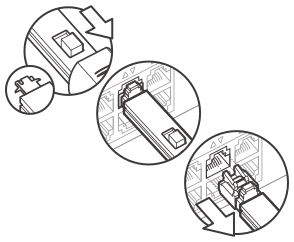
Engage & pull out
Press the button of the key backward to engage the lock for removal and pull out the key.
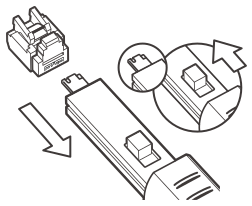
Release the port lock
Press the button of the key forward to release the port lock from the key.