
Lock Key Basic
Get to know the parts of the key, then switch between Insert mode and Retrieval mode to install and remove your portArgus locks.
User Guides / Lock Key Basic
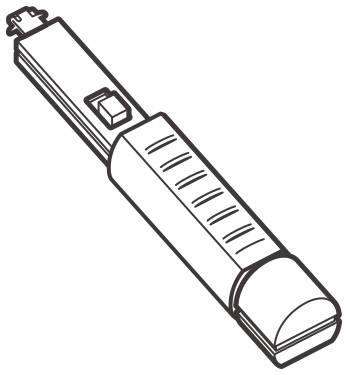
Lock Key Basic
The key that installs and removes portArgus locks — one key for the port locks, cable locks and blockers listed below.
Parts of the Key
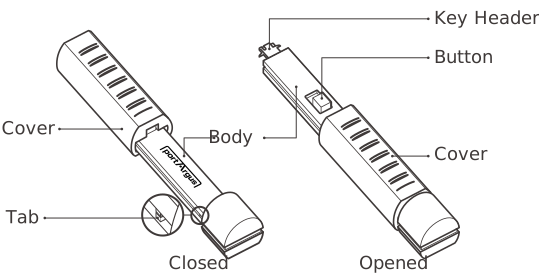
Step by Step
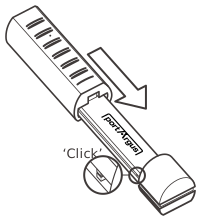
Expose the key header
To expose the key header, slide the cover until you hear it ‘click’.
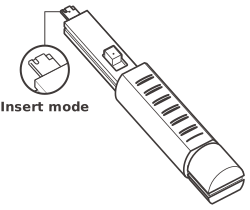
Insert mode
Press the button forward to enter Insert mode before engaging or releasing lock.
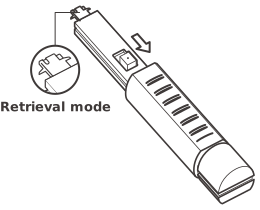
Retrieval mode
Pull the button back while the key header is inserted into the lock to engage. Once engaged, the lock can be removed.
• Make sure the key is carefully and fully engaged before removing lock.
• When sliding the cover, be careful not to pinch your hand.
• Please note that keys and locks are matched by color.
Compatible Products with Lock Key Basic
-
 USB Port Lock
-
 USB Cable Lock
-
 Smart Data Blocker
-
 Lockable Flash Drive
-
 RJ45 Port Lock
-
 LAN Cable Lock
-
 Keyboard | Mouse Lock
-
 Parallel Port Lock
-
 DVI Port Lock
-
 Serial Port Lock
-
 Network Module Lock (12p)
-
 Network Module Lock (8p)
-
 Network Module Lock (4p)